Updated October 2026 · Written by the My SEO Experts team, based on hands-on testing and the latest guides from Semrush, Anthropic and leading SEO practitioners.
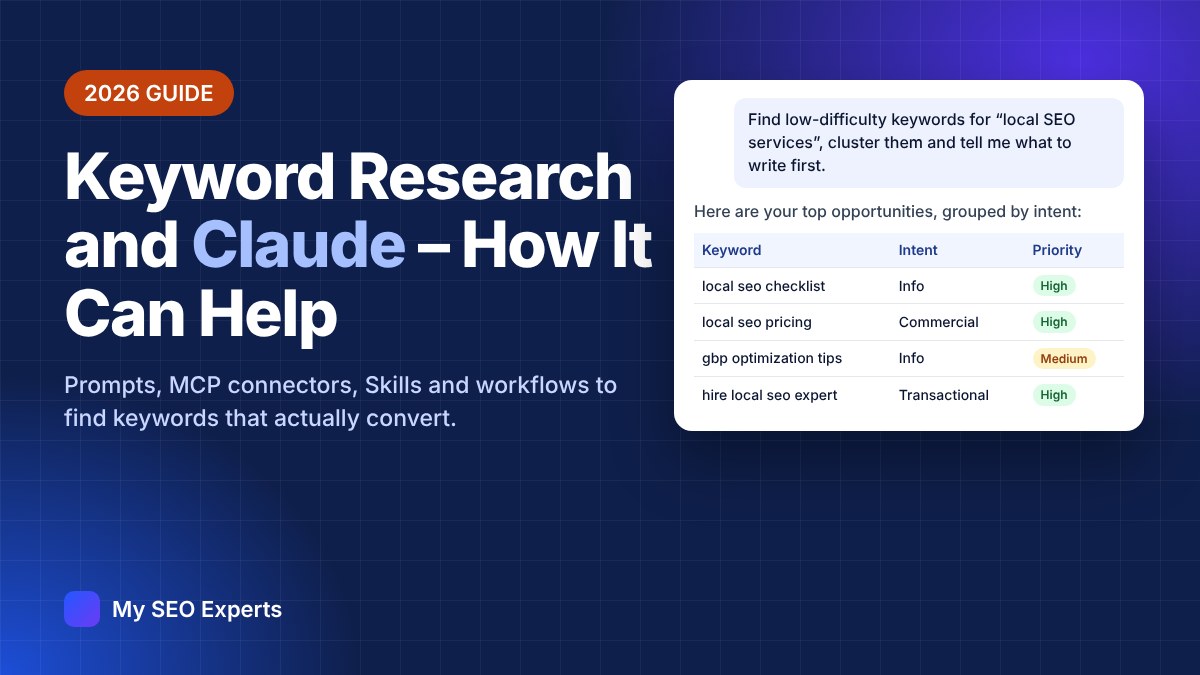
Keyword research used to mean hours in spreadsheets: exporting lists, removing duplicates, guessing intent and grouping terms by hand. In 2026, Claude — Anthropic’s AI assistant — can do most of that work in minutes. Connected to the right data, it can find keyword gaps against competitors, mine your Search Console for quick wins, turn customer reviews into search queries, cluster thousands of keywords and hand you a prioritised content plan.
But there’s a catch that most “AI keyword research” articles skip: Claude does not have search volume or keyword difficulty data built in. Used on its own, it can only brainstorm. Used with the right connectors, Projects and Skills, it becomes one of the most powerful keyword research assistants available.
This guide covers everything: what Claude can and can’t do, the five ways to set it up, step-by-step workflows with copy-paste prompts, a reusable Skill template, Google Ads and local SEO use cases, costs, limitations and the mistakes to avoid.
Key Takeaways
- Claude is the analyst, not the database. It brainstorms, classifies, clusters and prioritises — the numbers must come from an SEO tool.
- MCP connectors are the game changer. Semrush, Ahrefs, DataForSEO, Keyword Tool and others let Claude pull live keyword data during a conversation.
- Context beats clever prompts. A Claude Project with your business details, competitors and existing URLs produces far more relevant keywords than any single prompt.
- Customer language finds keywords tools miss. Reviews, Reddit threads and sales calls reveal the exact phrases buyers use.
- Skills make it repeatable. A keyword research Skill gives you the same structured output every time, for every client.
- Humans still decide. Use Claude to do the heavy lifting, then review, prioritise and approve.
Table of Contents
- Can Claude do keyword research?
- 5 ways to use Claude for keyword research
- Connecting keyword data: MCP connectors compared
- Step-by-step: setting up Claude for keyword research
- 8 keyword research workflows (with prompts)
- How to prioritise keywords with Claude
- Build a reusable keyword research Skill
- Claude for Google Ads and local SEO keywords
- Prompt library
- Limitations, costs and mistakes to avoid
- FAQs
Can Claude Do Keyword Research?
Yes — but it helps to be clear about which parts of keyword research Claude is good at, and which parts need outside data.
| Keyword research task | Claude on its own | Claude + SEO data (MCP or CSV) |
|---|---|---|
| Brainstorm seed keywords and topics | ✅ Excellent | ✅ Excellent |
| Generate long-tail and question keywords | ✅ Good (unvalidated) | ✅ Validated with real data |
| Search volume, keyword difficulty, CPC | ❌ Guesses only | ✅ From your connected tool |
| Classify search intent and funnel stage | ✅ Excellent | ✅ Excellent, at scale |
| Cluster keywords by topic | ✅ Good for small lists | ✅ Thousands of keywords in batches |
| Competitor keyword gaps | ❌ No access to rankings | ✅ Live gap analysis |
| Search Console quick wins | ⚠️ Only if you upload CSVs | ✅ CSV upload or third-party connector |
| Live SERP features (AI Overviews, PAA) | ⚠️ Web search only | ✅ Via SERP-enabled connectors |
| Turn keywords into content briefs | ✅ Excellent | ✅ Excellent |
Rule of thumb: if Claude gives you a search volume number and you haven’t connected a data source or uploaded a file, treat that number as made up.
5 Ways to Use Claude for Keyword Research
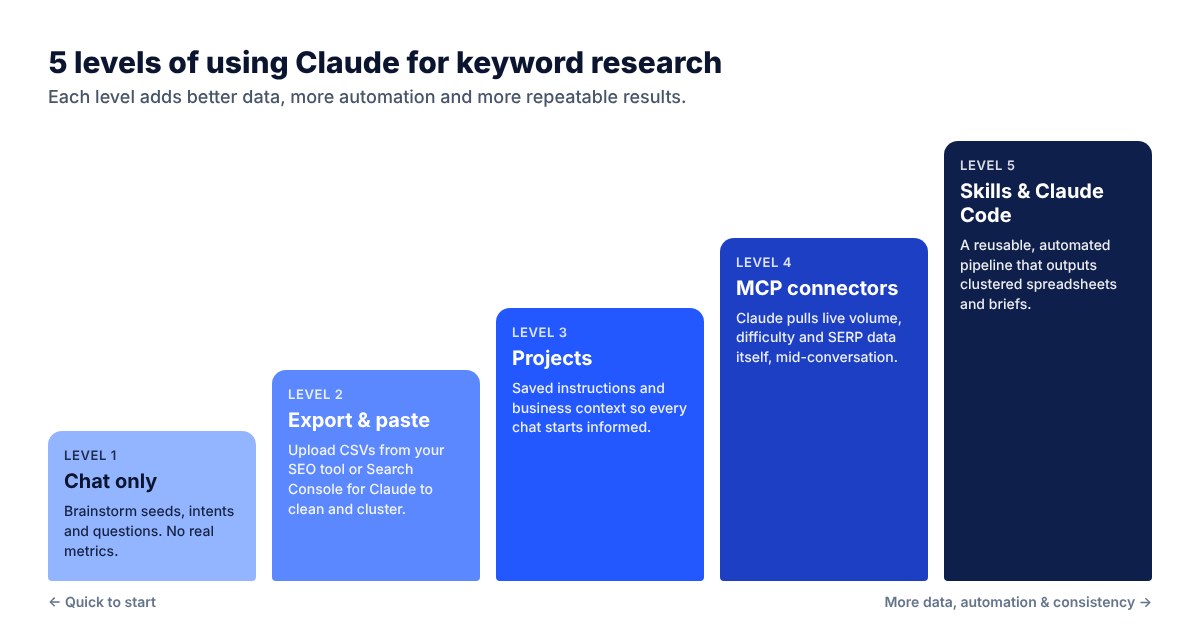
There isn’t one “right” way to use Claude for keyword research. Think of it as five levels — each adds better data, more automation and more consistent results.
| Level | How it works | Best for | Setup time | Data quality |
|---|---|---|---|---|
| 1. Chat only | Ask Claude for ideas, questions, intents and angles | Brainstorming, new niches | None | No metrics |
| 2. Export & paste | Export CSVs from Semrush, Ahrefs, Keyword Planner or Search Console and upload them | One-off analysis, cleaning and clustering | Minutes | As fresh as the export |
| 3. Projects | Saved instructions, business context and files in a Claude project | Ongoing work for one site or client | 15–30 min | Depends on files |
| 4. MCP connectors | Claude calls an SEO tool directly mid-conversation | Regular research, competitor gaps | 5–15 min | Live, per request |
| 5. Skills & Claude Code | A packaged, repeatable workflow that outputs spreadsheets and briefs | Agencies, large sites, scaled research | 1–3 hours | Live and consistent |
Export-and-paste vs live MCP connection
| Export & paste | Live MCP connector | |
|---|---|---|
| Where the data comes from | A file you download from your SEO tool | Claude queries the tool directly |
| Freshness | Stale once exported | Live on every request |
| Follow-up questions | Need a new export | Claude fetches more data itself |
| Multi-step research | Manual stitching | Claude runs the whole loop |
| Cost | Your existing tool subscription | Tool subscription or API credits |
| Best for | Occasional, one-off analysis | Ongoing research and content planning |
Connecting Keyword Data: MCP Connectors Compared
MCP (Model Context Protocol) is the open standard that lets Claude use external tools. In Claude you add them from Settings → Connectors (or the “+” menu in a chat); in Claude Code you add them with the claude mcp add command. Here are the most common keyword data sources used with Claude in 2026:
| Data source | How it connects | What Claude gets | Pricing model | Good to know |
|---|---|---|---|---|
| Semrush | Official connector (Semrush plan with API/MCP access) | Volume, KD, intent, keyword gap, competitor rankings | Semrush subscription + API units | API units can run out fast — limit rows in prompts |
| Ahrefs | Official MCP (paid plan) | Keywords Explorer data, matching/related terms, rankings, backlinks | Ahrefs subscription | Large index; strong difficulty scores |
| DataForSEO | MCP server with API credentials | Volume, KD, CPC, intent, SERP results, ranked keywords | Pay-as-you-go credits | Low cost per query; popular with Claude Code users |
| Keyword Tool (keywordtool.io) | Connector directory or custom connector URL | Suggestions, volume, CPC, competition, Google & Bing data | Keyword Tool Pro plan, daily request limits | Quota shared between web, API and MCP |
| Google Search Console | CSV export (no official Google MCP) | Your real queries, clicks, impressions, CTR, position | Free | Re-export monthly; the most trustworthy data you have |
| Google Ads / Keyword Planner | CSV export or third-party MCP | Search terms, conversions, CPC ranges | Free with an Ads account | Best source for commercial keywords |
| Claude web search | Built in | Live SERPs, competitor pages, Reddit threads | Included | No volume data — use for qualitative research |
Tip: Don’t connect every tool at once. Start with one keyword data source plus your Search Console export. Two consistent sources beat five that disagree.
Step-by-Step: Setting Up Claude for Keyword Research
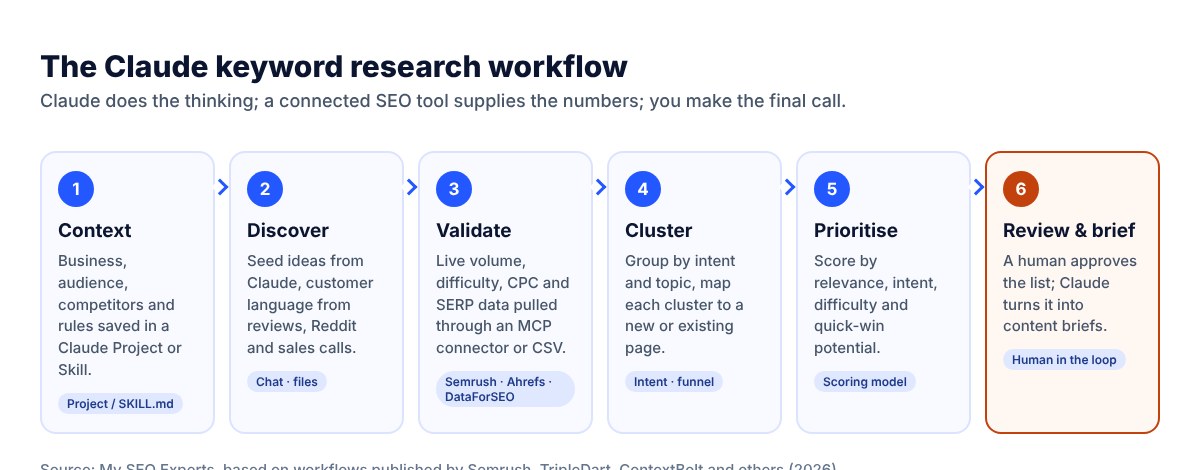
Step 1: Create a Claude project
In Claude, create a new Project (for example “Keyword Research – myseoexperts.com”). Everything you add here — instructions, files and past chats — is available in every new conversation inside the project, so you don’t have to repeat yourself.
Step 2: Add project instructions
Instructions tell Claude your process, which data to trust and what the output should look like. Here’s a template you can adapt:
You are the keyword research assistant for My SEO Experts.

DATA SOURCES
- Live keyword data: the connected SEO MCP (Semrush / Ahrefs / DataForSEO).
- Search Console: the latest Queries.csv and Pages.csv in this project.
- Existing URLs: site-urls.csv in this project.
- Customer language: reviews, Reddit threads and call transcripts I paste in.

RULES
- Never invent search volume or difficulty. If a metric is missing, write "no data".
- Always say which data source and country each number comes from.
- Exclude branded and navigational keywords unless I ask for them.
- Return only the number of rows I ask for, to save API credits.
- If a tool call fails, tell me instead of retrying repeatedly.

OUTPUT
- Default to a table with: keyword | volume | KD | CPC | intent | funnel stage | cluster | new page or existing URL | priority | reason.
- Offer a CSV download for anything over 20 rows.
Step 3: Give Claude your business context
Generic input produces the same keyword lists your competitors get. Upload a short business context document that answers five questions:
- What do you sell? Services, products, price points and what you don’t offer.
- Who buys it? Industries, company size, job titles, locations.
- What problems do you solve? In your customers’ words, not marketing language.
- Who are your competitors? 3–5 domains that rank for what you want.
- What are the rules? Topics to avoid, regulated claims, brand terms, target countries.
Also upload a list of your existing URLs (export your sitemap) so Claude can tell you whether a keyword needs a new page or belongs on one you already have — this prevents keyword cannibalisation.
Step 4: Connect your keyword data
- Connector: open Settings → Connectors, find your SEO tool (or add a custom connector URL), click Connect and sign in.
- Search Console: in GSC go to Performance → Search results, set the last 3 months, click Export → CSV and upload
Queries.csvandPages.csvto the project. - Test it: ask “What is the search volume and keyword difficulty of ‘seo services’ in the United States? Tell me which tool you used.” If Claude names the tool and returns numbers, you’re connected.
8 Keyword Research Workflows With Claude (With Prompts)
Each workflow below includes a copy-paste prompt. Replace the text in [brackets] with your own details.
Workflow 1: Seed-to-cluster expansion
The classic starting point: turn a handful of seed keywords into validated, clustered opportunities.
Using the connected keyword tool (Google, United States), expand these seeds:
[seed 1], [seed 2], [seed 3]

1. Pull matching terms, related terms and questions for each seed.
2. Keep keywords with volume ≥ 50 and KD ≤ 40.
3. Classify intent (informational / commercial / transactional / navigational) and funnel stage.
4. Group them into topic clusters and name each cluster.
5. Show the 30 best opportunities in a table and tell me which cluster to write first and why.
Workflow 2: Competitor keyword gap analysis
Find keywords your competitors rank for that you don’t — the fastest way to discover proven demand in your niche.
Run a keyword gap analysis between myseoexperts.com and these competitors:
[competitor1.com], [competitor2.com], [competitor3.com]

- Find keywords where at least one competitor ranks in the top 10 and we don't rank in the top 50.
- Filters: volume ≥ 100, KD ≤ 45, exclude branded terms.
- List the top 10 per competitor, then up to 10 keywords ALL competitors rank for but we don't.
- For each keyword, suggest whether it needs a new page or fits an existing URL from site-urls.csv.
Workflow 3: Search Console quick wins
Your own Search Console data is the most accurate keyword data you have. Claude is excellent at finding the opportunities hidden inside it.
Analyse the attached Search Console Queries.csv and Pages.csv (last 3 months).
Find:
A) Queries ranking in positions 8–20 with 100+ impressions (striking distance).
B) Queries with high impressions but CTR below 1% (title/meta rewrite candidates).
C) Queries with impressions where no page clearly matches the intent (content gaps).
Output a table: query | page | position | impressions | CTR | issue type | recommended action.
Sort by estimated extra clicks if we reach position 3.| Opportunity type | What it means | Typical action |
|---|---|---|
| Striking distance (positions 8–20) | Google already sees the page as relevant | Improve content depth, internal links and title |
| High impressions, low CTR | You rank but searchers don’t click | Rewrite title tag and meta description |
| Impressions with no matching page | Demand you haven’t targeted directly | Create a new page or section |
| Two pages for one query | Keyword cannibalisation | Merge pages or differentiate their intent |
Workflow 4: Mine customer language (reviews, Reddit and sales calls)
SEO tools only know about keywords that already have measurable volume. Your customers often search with phrases tools miss. Paste competitor reviews from G2, Capterra, Trustpilot or Google, Reddit threads in your niche, or anonymised sales call transcripts, and ask Claude to turn them into search queries.
Below are 40 customer reviews of competitors (pasted).
1. Group them into pain-point themes.
2. For each theme, write 5 search queries a frustrated customer would type into Google.
3. Quote the review snippet each query came from.
4. Then check each query in the connected keyword tool and add volume and KD (write "no data" if none).
Don't drop zero-volume queries — flag them as "validate manually".
Zero volume doesn’t mean zero demand. A phrase like “how to find freelance clients consistently” may show no volume in tools yet bring highly motivated buyers. Ask Claude for close variations — a slightly different wording often does show measurable volume.
Workflow 5: SERP and search intent analysis
Before writing, understand what Google is already rewarding for a keyword — including whether an AI Overview appears.
For the keyword "[keyword]":
1. Pull the current top 10 organic results and SERP features (AI Overview, featured snippet, People Also Ask, video, local pack).
2. Summarise the format and angle of each ranking page.
3. Tell me the dominant search intent and the best content format to compete.
4. Identify the angle or sub-topic none of the top 10 cover well.
5. List the People Also Ask questions we should answer on the page.
Use Claude to classify intent for every keyword in your list. This table shows the classification we ask Claude to use:
| Intent | What the searcher wants | Example keyword | Best page type |
|---|---|---|---|
| Informational | To learn or solve a problem | what is local seo | Guide, blog post, video |
| Commercial investigation | To compare options before buying | best seo agency for small business | Comparison, list, case study |
| Transactional | To buy or hire now | hire local seo expert | Service page, pricing page |
| Navigational | To reach a specific brand or site | semrush login | Usually skip (not your brand) |
Workflow 6: Keyword clustering at scale
Claude can cluster a few hundred keywords in a single pass. For larger lists, process in batches of about 200 keywords and ask Claude to merge the clusters at the end. Ask it to cluster by search intent and SERP overlap rather than just shared words — “seo cost” and “how much does seo cost” belong on the same page; “seo cost” and “seo cost calculator” may not.
Workflow 7: Turn clusters into content briefs
Turn the approved cluster "[cluster name]" into a content brief:
- Primary keyword, 5–10 secondary keywords and questions to answer
- Search intent and recommended format (guide, comparison, service page, tool)
- Suggested title tag (≤ 60 characters) and meta description (≤ 155 characters)
- H2/H3 outline based on the top-ranking pages, plus the unique angle we'll add
- Internal links: 3 pages from site-urls.csv to link from, and 3 to link to
- Schema type and any table, image or video the page needs
Workflow 8: The one-prompt content plan
Once your project is set up, you can run the whole process in a single request: “Find 30 keyword opportunities around [topic] with volume ≥ 100 and KD ≤ 35, cluster them, check our existing URLs, and give me a 3-month content calendar with a title and unique angle for each article.” Claude will call the connected tools, filter the results and return a plan you can review.
How to Prioritise Keywords With Claude
The biggest mistake in keyword research is sorting by search volume. A 50-search keyword with buying intent is often worth more than a 5,000-search informational one. Ask Claude to score keywords with transparent weights and to explain its reasoning, so you can challenge it.
Merge every validated keyword list from this chat into one table.
Score each keyword from 1–10 using:
- Business relevance (40%) — how closely it matches what we sell
- Intent (25%) — transactional > commercial > informational
- Difficulty vs our authority (20%) — lower is better
- Existing ranking (15%) — bonus if we already rank 8–20
Then place each keyword in the opportunity matrix (quick win / content cluster / fill-in / skip),
explain the top 10 scores in one line each, and export everything as CSV.| Factor | Weight | What Claude checks |
|---|---|---|
| Business relevance | 40% | Does the keyword match a service or product you actually sell? |
| Search intent | 25% | Transactional and commercial intent score higher than informational |
| Difficulty vs. authority | 20% | Can your domain realistically rank in the top 5? |
| Existing rankings | 15% | Bonus for keywords already ranking in positions 8–20 |
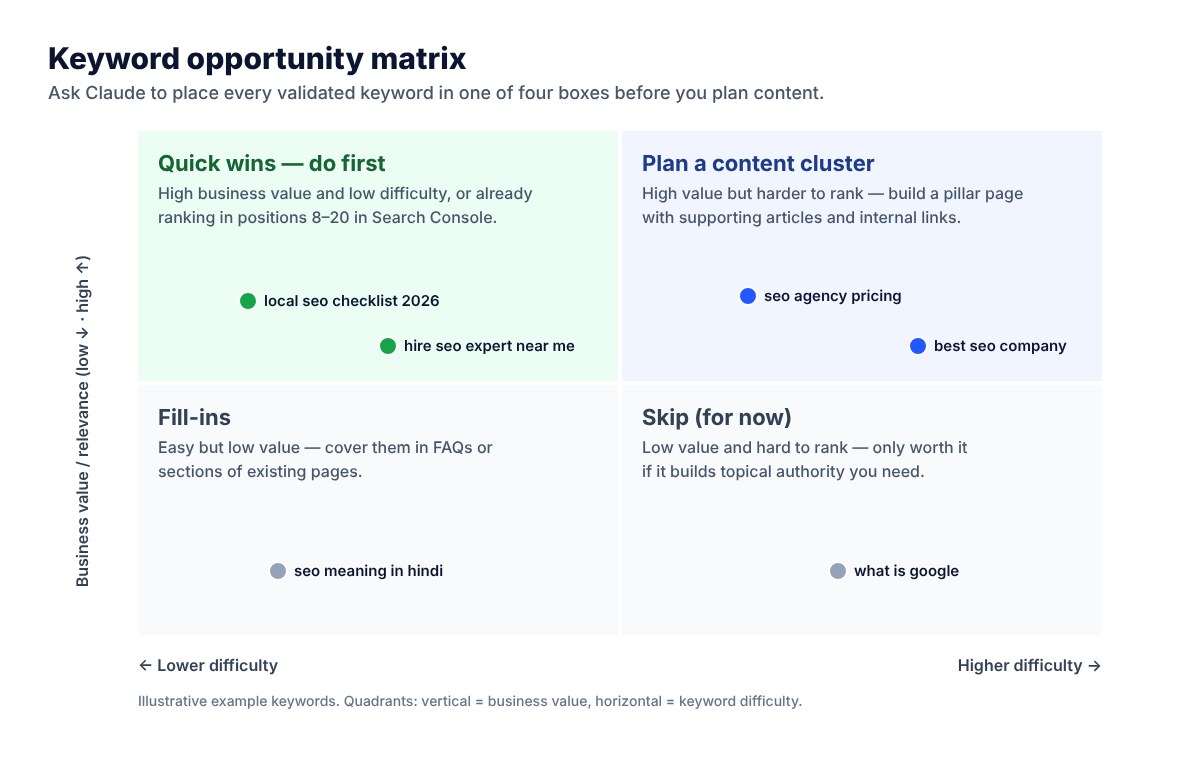
Example of the final output
Here’s the kind of table Claude returns at the end of the process (figures are illustrative):
| Keyword | Volume | KD | Intent | Cluster | Page | Priority |
|---|---|---|---|---|---|---|
| local seo services | 2,400 | 38 | Transactional | Local SEO | /local-seo-services/ (existing) | High |
| local seo checklist | 880 | 22 | Informational | Local SEO | New guide | High |
| how much does local seo cost | 390 | 18 | Commercial | Pricing | /pricing/ (add section) | High |
| google business profile optimization | 1,300 | 35 | Informational | Google Maps | /local-map-listings/ (existing) | Medium |
| seo for dentists | 590 | 29 | Commercial | Industries | New landing page | Medium |
| what is local seo | 1,900 | 41 | Informational | Local SEO | Section in guide | Low |
Build a Reusable Keyword Research Skill
Claude Skills are folders containing a SKILL.md instruction file and, optionally, scripts, templates and reference files. Claude loads a Skill automatically when your request matches its description. A keyword research Skill means every team member — and every client project — gets the same process and the same output format.
---
name: keyword-research
description: Run keyword research for My SEO Experts or a client. Use when the user asks for keyword ideas, keyword gaps, clusters, search intent or a content plan.
---

# Keyword research

## Inputs to ask for (if missing)
- 3–5 seed keywords, the domain, target country and language
- Up to 3 competitor domains

## Steps
1. Pull matching terms, related terms and questions for each seed from the SEO MCP.
2. Pull the domain's ranking keywords in positions 4–20.
3. Remove branded, navigational and irrelevant terms (see exclusions.md).
4. Classify intent and funnel stage for every keyword.
5. Cluster by topic; map each cluster to an existing URL or "new page".
6. Score priority with the weights in scoring.md.
7. Export an .xlsx with tabs: All keywords, Quick wins, Clusters, Excluded.

## Rules
- Never estimate metrics yourself. Missing data = "no data".
- Process large lists in batches of 200 keywords.
- Flag ambiguous keywords for human review instead of guessing.
Add supporting files such as exclusions.md (terms to always remove, e.g. consumer or job-seeker queries for a B2B brand) and scoring.md (your priority weights). For different industries, keep separate exclusion lists — a fintech client and a dental clinic need very different filters.
Claude Code for keyword research
If you’re comfortable with a terminal, Claude Code takes this further. It can run your Skill, call the SEO MCP, write Python to merge and de-duplicate large CSV files, and save the final spreadsheet straight to your computer. It’s ideal for agencies running research for many clients or sites with thousands of pages. Pair it with a writing Skill and you can go from seed keywords to drafted briefs in one session.
Claude for Google Ads and Local SEO Keyword Research
Google Ads
Search terms reports are where Claude shines for paid search. Export the report (or use a Google Ads connector) and ask:
Attached is our Google Ads search terms report (last 60 days).
1. Find search terms with 3+ conversions and CPA below $40 that are not yet keywords — suggest them as exact match.
2. Find terms with spend above $25 and zero conversions — group them by theme as negative keyword candidates.
3. Flag any search terms triggering more than one ad group (cannibalisation).
Explain the expected impact of each change. Do not recommend pausing anything with fewer than 20 clicks.
Use 60–90 days of data, wait for enough clicks before acting on small keywords, and always apply changes yourself — Claude recommends, you decide.
Local SEO
For local businesses and multi-location brands, Claude can build keyword sets for every city and separate map-pack keywords from location-page keywords:
We are an SEO agency serving [city]. Using the keyword tool with location set to [city/country]:
- Find "service + city", "service + near me" and "best/top/affordable + service + city" variations.
- Add neighbourhood and nearby-town modifiers: [area 1], [area 2], [area 3].
- Separate keywords for the Google Business Profile (map pack intent) from keywords for location pages.
- Suggest one location page per city with its primary keyword and 5 supporting keywords.
Claude Keyword Research Prompt Library
| Goal | Prompt to use |
|---|---|
| Find question keywords | “List 30 questions people ask about [topic], grouped by funnel stage, with volume from the connected tool.” |
| Find long-tail variations | “Give me long-tail variations of [keyword] with 3+ words, volume ≥ 20 and KD ≤ 20.” |
| Check keyword difficulty in bulk | “Score this list for difficulty and tell me which ones we can rank for with a DR of [x].” |
| Detect cannibalisation | “Using Pages.csv and Queries.csv, find queries where 2+ of our URLs get impressions.” |
| Find seasonal keywords | “Show the monthly trend for these keywords and tell me when to publish each one.” |
| Find AI Overview keywords | “Which of these keywords trigger an AI Overview, and what format do the cited pages use?” |
| Refresh old content | “Which of our pages lost the most clicks year-on-year, and which new keywords should we add to them?” |
| Find ‘vs’ and ‘alternative’ keywords | “Find ‘[competitor] vs’ and ‘[competitor] alternatives’ keywords with commercial intent.” |
| Translate keywords for new markets | “Find the keywords people actually use in [country/language] for [topic] — don’t just translate.” |
| Plan internal links | “For each cluster, suggest which existing pages should link to the new page and with what anchor text.” |
Limitations, Costs and Mistakes to Avoid
Limitations
| Limitation | Why it matters | How to handle it |
|---|---|---|
| No built-in keyword metrics | Unconnected numbers are guesses | Connect a data source or upload exports |
| Metrics are estimates | Volumes differ between Semrush, Ahrefs and others | Stick to one primary tool and note the source |
| Usage and API limits | Long chats and big pulls use up credits | Limit rows, batch large lists, start new chats for new tasks |
| Not a rank tracker | Claude answers on demand; it doesn’t monitor rankings | Keep your rank tracking tool |
| Can misjudge intent or relevance | Ambiguous keywords may be misclassified | Ask Claude to flag uncertainty; spot-check 20 keywords |
| No official Search Console connector | GSC data must be exported | Re-upload CSVs monthly |
What it costs
You’ll need a paid Claude plan to use Projects, connectors and Skills comfortably, plus access to at least one keyword data source. At the time of writing, practitioners report DataForSEO as the cheapest way to start (pay-as-you-go credits, with each query costing a few cents), while Semrush, Ahrefs and Keyword Tool require their own subscriptions with MCP or API access. Check current pricing with each provider before you choose.
Common mistakes
- Trusting search volumes Claude gives without a connected data source.
- Skipping business context — and getting generic keywords your competitors already target.
- Sorting by volume instead of business value and intent.
- Ignoring Search Console quick wins in favour of brand-new keywords.
- Throwing out zero-volume customer phrases without testing variations.
- Creating new pages for keywords an existing page should cover (cannibalisation).
- Letting Claude make final decisions — or apply Google Ads changes — without human review.
Claude vs Traditional Keyword Research: Where the Time Goes
| Task | Traditional workflow | With Claude + connected data |
|---|---|---|
| Pulling keyword ideas from seeds | Manual exports from one or more tools | One prompt; Claude calls the tool |
| Cleaning and de-duplicating | Spreadsheet formulas and manual checks | Automatic |
| Classifying intent | Keyword by keyword | Thousands of keywords in batches |
| Clustering | Manual grouping or a separate clustering tool | Automatic, with named clusters |
| Mapping to existing pages | Cross-checking your sitemap by hand | Automatic using your URL list |
| Writing briefs | Hours per brief | Minutes per brief, then human editing |
| Strategy and final decisions | SEO specialist | Still the SEO specialist |
Need Help With Keyword Research?
At My SEO Experts, we combine Claude-powered workflows with professional SEO tools and years of hands-on experience to build keyword strategies that bring in leads, not just traffic. We’ll research your market and competitors, find quick wins in your Search Console and deliver a prioritised content plan your team can act on.
Get a Free Keyword Research Quote →
Frequently Asked Questions
Can Claude do keyword research?
Yes, with one important condition. On its own, Claude is excellent at brainstorming seed keywords, classifying search intent, clustering and writing briefs, but it has no built-in search volume or keyword difficulty data. Connect it to an SEO tool (Semrush, Ahrefs, DataForSEO, Keyword Tool and others) through an MCP connector, or upload exported CSVs, and it becomes a complete keyword research assistant.
Is Claude better than ChatGPT for keyword research?
Both can brainstorm and cluster keywords. Claude’s strengths are long context (it can analyse large keyword exports and transcripts in one go), Projects for saved business context, Skills for repeatable workflows and wide MCP connector support. The quality of your results depends far more on the data you connect and the instructions you give than on the model you choose.
Can Claude give me accurate search volume?
Not by itself. Any search volume Claude gives without a connected data source is a guess. With a connector, Claude reports the numbers from that tool — which are themselves estimates and differ between providers. Always say which data source you used.
What is an MCP connector?
MCP (Model Context Protocol) is an open standard that lets Claude call external tools. An SEO MCP connector lets Claude look up keyword metrics, competitor rankings and SERP data while you chat, instead of you exporting and pasting spreadsheets.
Does Claude connect to Google Search Console?
At the time of writing there is no official Google Search Console connector from Google. The simplest method is to export the Performance report (Queries and Pages) as CSV and upload it to your Claude project each month. Some third-party MCP servers offer Search Console access — review their permissions carefully.
What is a Claude Skill for keyword research?
A Skill is a folder with a SKILL.md instruction file (and optional scripts or templates) that teaches Claude a repeatable process — for example: pull data for these seeds, classify intent, score priority and export a spreadsheet in this exact format. Once installed, Claude uses it automatically whenever you ask for keyword research.
Can I use Claude for Google Ads keyword research?
Yes. Claude is very good at analysing search terms reports: finding new exact-match keywords from converting queries, suggesting negative keywords, grouping terms into tight ad groups and flagging cannibalisation. Keep a human in charge of applying changes to the account.
Will AI keyword research replace SEO tools or SEO experts?
No. Claude replaces a lot of manual spreadsheet work — cleaning, de-duplicating, classifying and clustering — but it still relies on SEO tools for data and on human judgement for strategy, business priorities and final decisions.
Conclusion
Claude won’t replace your SEO tools — but it can replace most of the manual work between them. Give it real data through MCP connectors or exports, give it your business context through a Project, make the process repeatable with a Skill, and keep a human in charge of the final decisions. That combination finds better keywords, faster, than either a tool or an AI could on its own.
Further reading: Semrush – How to do keyword research with Claude · Keyword Tool MCP · Claude documentation · Model Context Protocol.